Ready in 2 minutes
With the beID Helper you can read your Belgian eID securely on websites that support it. No technical knowledge required.
Choose your systemThe beID Helper runs locally on your computer — nothing is sent to a server.
How it works
What is beID? · Which software do you need?
Frequently asked questions
What is the beID Helper?
The beID Helper is a small, free program that connects your Belgian eID (electronic identity card) to websites that support it. You can read your identity data or sign documents straight from your browser.
Is it free and secure?
Yes. The beID Helper is completely free and runs locally on your own computer. Your data and PIN stay with you — nothing is sent to a server. You approve every operation yourself with your PIN.
What do I need?
A Belgian eID, a card reader and the official government eID software (eid.belgium.be). Then install the beID Helper once and you are ready.
Does it work on Windows, macOS and Linux?
Yes. The beID Helper is available for Windows, macOS (Apple Silicon and Intel) and Linux (Debian/Ubuntu). The right version is detected automatically on the download page.
Can I sign documents with it?
Yes. With your eID you can sign PDF documents with legal validity (PAdES). Try it right away with our free tool: Sign a PDF with your eID →
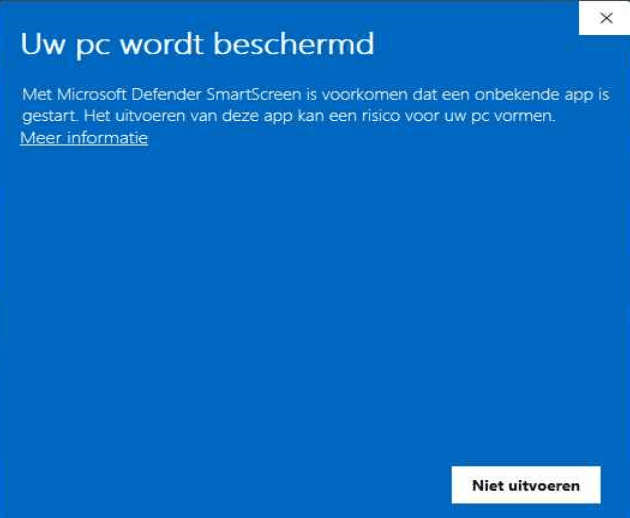
Windows blocks the installation (SmartScreen)?
On Windows, SmartScreen may show “Windows protected your PC” because the app is still new. Click “More info” and then “Run anyway” to continue the installation. The beID Helper is signed and safe. More details →
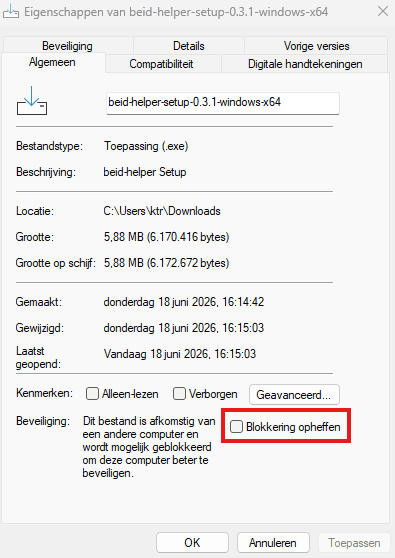
The downloaded file is blocked (Windows)?
Windows sometimes marks files from the internet as blocked. Right-click the downloaded file → Properties → tick “Unblock” at the bottom → OK. Then open the file again. More details →
The website cannot find the beID Helper, even though it is installed?
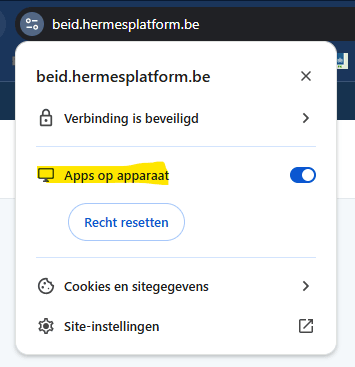
Your browser has to allow access to the local beID Helper (127.0.0.1). Since late 2025, Chrome and Edge ask for this with a “local network access” prompt — click Allow. Also check that the beID Helper icon is in the taskbar, bottom right. Not sure? Test your connection → · More details →
This is the beID Helper icon in the taskbar — with and without a card in the reader: